
Appearance#
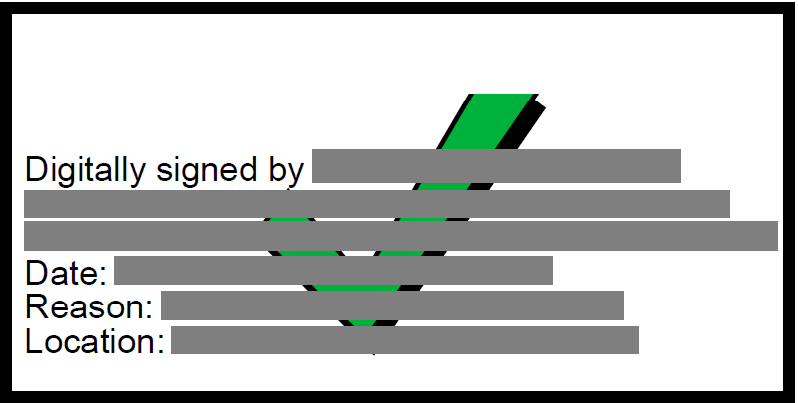
The signature appearance is described by atick.Style(...). By default it shows the ATick logo on
the left, the signer details on the right, and the validity mark.
atick.Style(
    cn="Aniket Chaturvedi",          # common name (shown bold after "Digitally Signed by:")
    org="Acme Corp",                  # organisation line
    reason="Approved",                # "Reason: …"
    location="New Delhi",             # "Location: …"
    date=None,                        # None = current time; "" = no date line; or your own string
    date_format="%d-%b-%Y %I:%M %p",  # strftime pattern for the auto date — any world format
)
Date / time format#
atick.Style(date_format="%Y-%m-%d %H:%M:%S")   # 2026-06-10 15:54:21  (ISO-ish)
atick.Style(date_format="%d/%m/%Y %H:%M")      # 10/06/2026 15:54     (DD/MM/YYYY)
atick.Style(date_format="%m/%d/%Y %I:%M %p")   # 06/10/2026 03:54 PM  (US)
atick.Style(date_format="%A, %d %B %Y")        # Wednesday, 10 June 2026
atick.Style(date="Signed on 10-Jun-2026")      # a fixed string you provide
atick.Style(date="")                            # no date line
Long names wrap onto more lines instead of shrinking the font, so the box never overflows.
The left side#
atick.Style(cn="…")                   # default: the ATick logo
atick.Style(cn="…", image="logo.png") # your own logo (path or bytes; transparency preserved)
atick.Style(cn="…", image=False)      # no logo
atick.Style(cn="…", image="cn")       # the CN as large text on the LEFT (Adobe-style)
The validity mark — ATick’s signature look#

The mark sits centred in the appearance and tells the reader the signature’s status at a glance:
atick.Style(cn="…", green_tick=True)    # the "?" mark — Adobe paints it GREEN if valid+trusted, RED if invalid
atick.Style(cn="…", always_check=True)  # ATick's green-tick graphic as the base (Adobe still reds a bad signature)
atick.Style(cn="…", green_tick=False)   # no mark — a plain signature
green_tick=True— the classic validity mark: a?that Adobe Acrobat repaints green for a valid, trusted signature and red for a broken one.always_check=True— embeds ATick’s own green-tick graphic (above) as the base, so the tick shows in every viewer; Adobe still overlays a red mark if the signature is actually invalid.
What it looks like#
The appearance ATick draws — the signer details with the green tick centred over them:
How Adobe shows it#
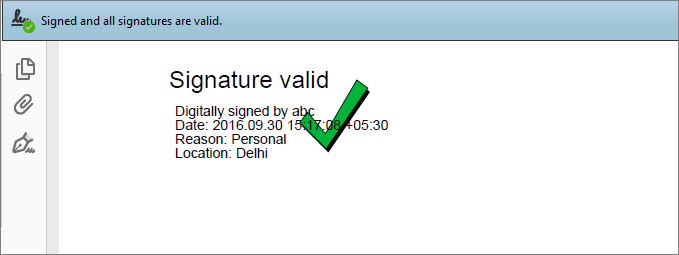
When the certificate is valid and trusted, Adobe Reader / Acrobat reports “Signed and all signatures are valid” and paints the tick green — exactly the reassurance your readers expect:
Every state Adobe can show#
ATick draws the appearance and the mark; Adobe then colours the mark based on the signature’s validity and whether it trusts the certificate, so your reader instantly sees the status:
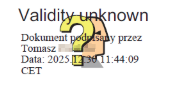
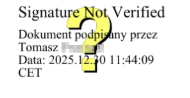
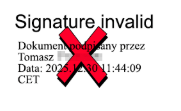
So the green tick appears only when the signature is valid and the signer’s certificate chains to a root Adobe trusts (the Adobe Approved Trust List, or your organisation’s trust). The same ATick appearance shows the question-mark or red-cross state automatically - you don’t draw those; Adobe does.
Colour the mark with any Python colour, or a gradient:
atick.Style(cn="…", mark_color="#E53935")            # hex
atick.Style(cn="…", mark_color="blue")               # CSS name
atick.Style(cn="…", mark_color=(255, 140, 0))        # RGB 0–255 (or 0–1 floats)
atick.Style(cn="…", mark_gradient=["red", "orange", "yellow"])   # axial gradient
Distinguished name#
atick.Style(cn="Aniket Chaturvedi", dn="CN=Aniket Chaturvedi, O=Personal, C=IN")
The DN is shown directly under the “Digitally Signed by:” line.
Custom-text-only appearance#
Show only your own text — no “Signed by”, no date, no CN structure. \n starts a new line;
*word* makes that run bold.
atick.Style(body="*APPROVED*\nReviewed by: *Aniket Chaturvedi*\nThis document is *legally binding*.")
Invisible signature#
A cryptographically valid signature that draws nothing on the page:
atick.sign_pfx(pdf, pfx=…, password=…, style=atick.Style(cn="…"), placements=[]) # empty placements
Other Style options#
font_size, text_dx, text_top, text_color, bg_color, border, border_color,
border_width, mark_scale, mark_dx, mark_dy, width, height, heading, ou, text.