ATick for Python#

Sign PDFs with confidence
ATick is the standalone PDF digital-signature library for Python — PAdES & CMS signing, USB tokens, the Windows store and Indian eSign, with zero dependencies.
import atick

signed = atick.sign_pfx(
    open("doc.pdf", "rb").read(),
    pfx=open("my.pfx", "rb").read(), password="••••",
    style=atick.Style(cn="Aniket Chaturvedi", reason="Approved"),
    placements=[(1, (300, 55, 575, 175))],
    pades=True, timestamp=True, ltv=True,     # PAdES-B-LT
)
open("signed.pdf", "wb").write(signed)
Everything you need to sign PDFs#
PFX/P12 or PEM files, USB tokens / smart-cards / HSMs (PKCS#11), and the Windows certificate store — one consistent API.
B-B, B-T, B-LT, B-LTA with RFC-3161 timestamps and long-term validation — recognised by Adobe Acrobat as “PAdES Signature Level”.
The complete CCA eSign flow (every API version) — prepare, sign the request, embed the ESP reply (rawrsa / PKCS7 / pkcs7Pdf / pkcs7complete).
Logo or CN-on-the-left, the validity mark (? / green tick), distinguished name, custom text,
invisible signatures, any date format.
Certification (DocMDP), field-locking (FieldMDP), pre-sign expiry / CRL / OCSP checks, password protection and metadata.
A revocation cache makes batch signing ~6× faster, multi-signatory documents stay valid, and every error is a clean Python exception.
The green tick your readers trust#
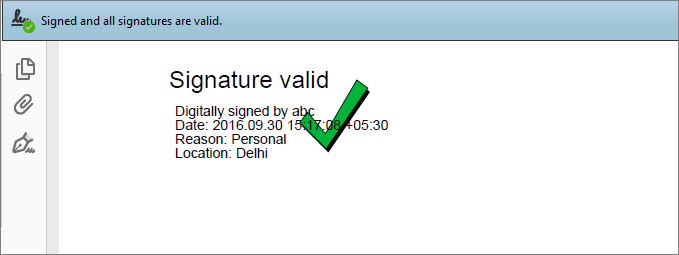
ATick draws a verified-signature appearance with a green tick. When the certificate is valid and trusted, Adobe Reader / Acrobat shows “Signed and all signatures are valid.” — the reassurance every signed document needs.
Why ATick#
ATick |
|
|---|---|
Dependencies |
none — the crypto, PKCS#12/PEM, PKCS#11, image decode, timestamping and LTV are all built in |
Install |
|
Interfaces |
a Python API and a full |
Platforms |
Windows, Linux and macOS (the Windows-store picker is Windows-only) |
Errors |
every failure is a Python |